Every year — and the interval keeps shrinking — someone asks me to help renew a ClearPass certificate. Certificates confuse people for good reasons: every platform wants a different format (PFX, PEM, JKS, you name it), and cloud CAs often will not hand you the private key when you generate a CSR in the browser. That forces a rekey unless you already know the tooling. Certificate lifetimes keep getting shorter, so the renewal calendar is only going to get noisier.
cert-manager is my attempt to take most of that work off the table for ClearPass. It is an unofficial fork of nowireless4u/cert-manager. You install it on a computer that stays on, fill in a setup page, and it requests certificates from Let’s Encrypt, installs them on ClearPass, and renews them for you.
This post is that path: what you need, how to start it, and how to configure it. It is not a full ClearPass click-through yet — I will add those screenshots in a follow-up pass.
What you need
- Docker and Docker Compose on a computer (the host) that ClearPass can reach, and that stays on. If the computer or the container stops, renewals stop, and ClearPass cannot pick up a new certificate.
- One of these DNS providers, so the tool can prove you own the hostname. Let’s Encrypt does that with a DNS-01 check: it asks for a short-lived TXT record (a text entry) on your domain, and the tool creates and removes that record for you.
- Cloudflare (an API token with Zone DNS Edit and Zone Zone Read)
- Amazon Route 53 (an IAM access key that can change records in the hosted zone)
- DigitalOcean (a write token for the domain)
- A ClearPass API client already created in ClearPass (Administration → API Services → API Clients): operating mode ClearPass REST API, grant type Client credentials. In a lab, Super Administrator is acceptable so you can move fast. For any real deployment, follow least-privilege principles and give the client only what it needs to manage server certificates and the trust list (the list of certificate authorities ClearPass trusts). I am still working on making that granular path easy; this post does not claim a turnkey least-privilege profile yet.
You create that API client in ClearPass first — the tool cannot create it for you, and the client secret is shown only once.
What it does for you
- Handles the DNS proof automatically. You pick Cloudflare, Route 53, or DigitalOcean once and save it on the setup page.
- Installs the certificate on ClearPass, and adds missing certificate authorities to the trust list when they are needed. If that trust-list step fails, you will see it in the result; a successful install is not undone by that failure.
- Renews Let’s Encrypt certificates for you. Once a day, it requests a new certificate when one is within 30 days of expiry, then installs it.
- Puts the managed certificate back if someone changes it on the appliance. About every five minutes it checks what is on ClearPass against the copy it stored, and reinstalls that stored copy when they differ. That is the same certificate, not a new one from Let’s Encrypt.
- Lets you bring your own certificate if you already have a PEM chain and private key. The daily job will not renew that one, but install and the “put it back” check still apply.
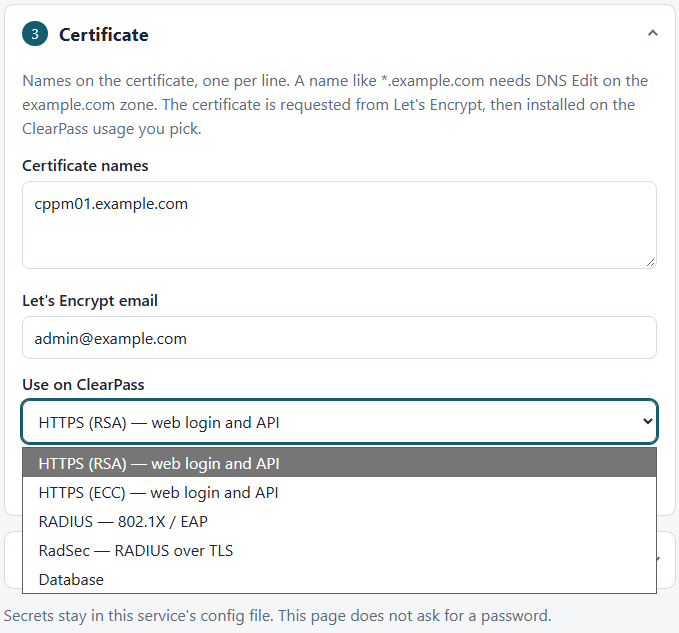
On ClearPass, the tool can install certificates for HTTPS (RSA or ECC), RADIUS, RadSec, and Database.
Install it
Get the files, create a settings file from the example, set two values, and start it:
git clone https://github.com/zemerick1/cert-manager.gitcd cert-managercp .env.example .envOpen .env and set:
EDGE_DOMAIN— the hostname or IP of this computer. Every ClearPass server must be able to reach port 80 on that address. That is how ClearPass downloads the certificate file (a PFX: a packaged certificate and private key).ADMIN_PASSWORD— the password for the setup page. Set one before you expose this on a network. The sign-in name isadminunless you also setADMIN_USERNAME. If the password itself contains a$, write it as$$so Docker Compose does not treat it as a variable.
Then start it:
docker compose up -dOpen http://localhost:8000/ in a browser on this computer, or http://MachineIP:8000/ from another machine. If you set ADMIN_PASSWORD, you will see a sign-in page first.
Leave the computer and the container running. That is what keeps renewals going.
Configure it on the setup page
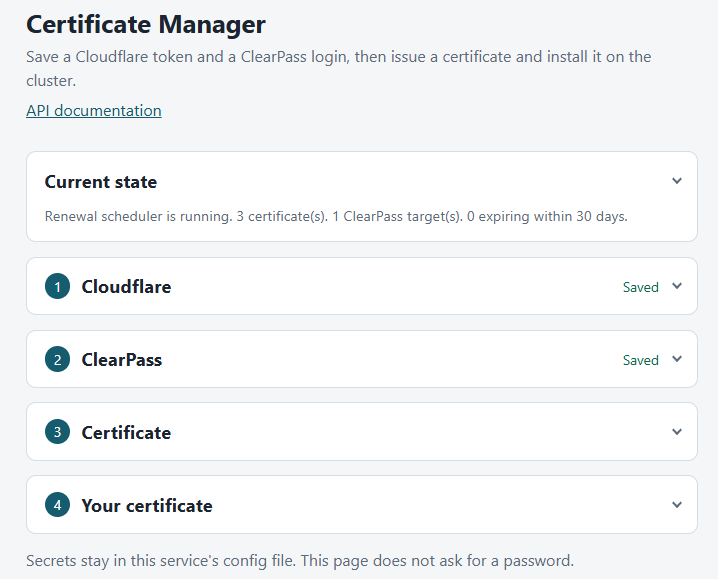
The cards start collapsed. Current state tells you whether automatic renewal is running, how many certificates are saved, and how many expire within 30 days.
DNS provider
Pick Cloudflare, DigitalOcean, or Route 53. Saving again replaces the credential, including the secret. The page keeps one provider at a time.
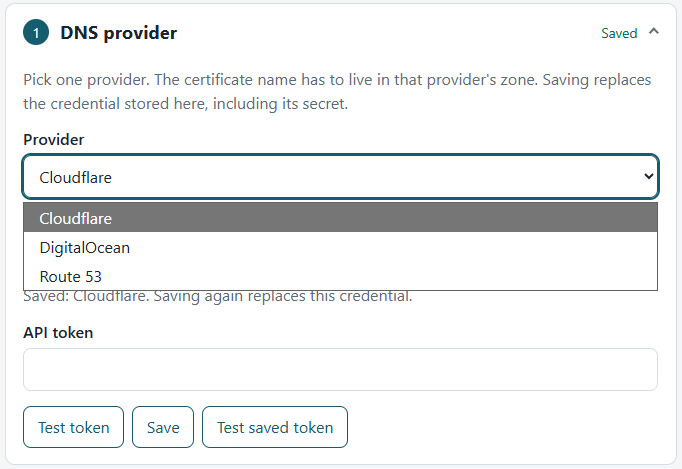
- Cloudflare: My Profile → API Tokens → Create Token. Give it Zone DNS Edit and Zone Zone Read on the zone that owns the certificate name. Do not use the Global API Key. Use Test token before you request a certificate.
- DigitalOcean: API → Tokens → Generate New Token with Write. Copy it now — DigitalOcean shows it once. Test token lists your domains and does not create records.
- Route 53: an IAM access key that can change records in the hosted zone. Region is optional (Route 53 is global).
ClearPass
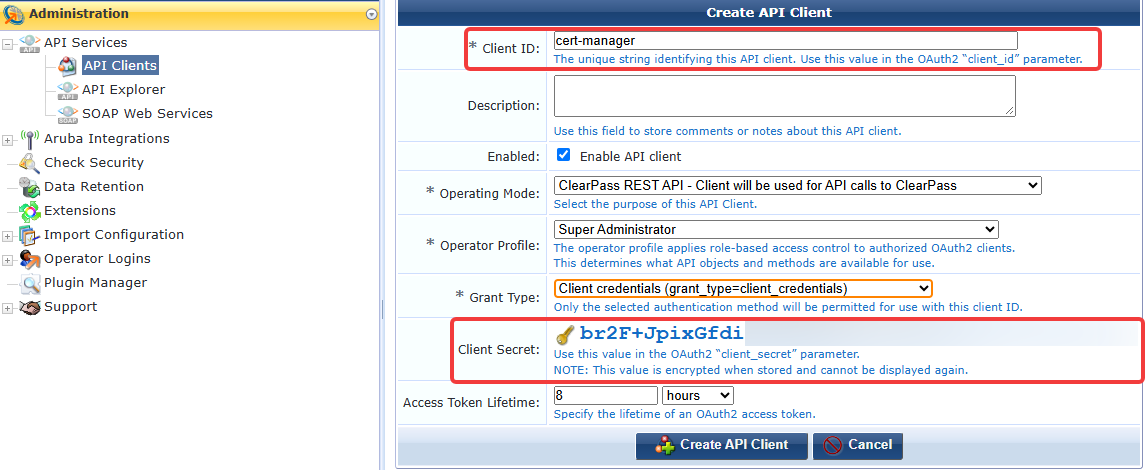
Create the API client in ClearPass first. Lab shortcut: Super Administrator works. Outside the lab, stick to least privilege — I am working on that path in the background. Then enter the ClearPass host, client id, and client secret on the ClearPass card. Those are the credentials for talking to ClearPass; they are not the setup-page sign-in (ADMIN_USERNAME / ADMIN_PASSWORD).
Test login should show the DNS names currently installed for HTTPS (RSA), HTTPS (ECC), RADIUS / EAP, RadSec, and Database.
If you have more than one ClearPass server, put the main (publisher) server as the host and list the others under Other cluster nodes so each of them can receive the certificate.
Certificate (Let’s Encrypt)
Enter the names that belong on the certificate, a Let’s Encrypt account email, and the ClearPass usages this certificate should be installed for. Issue and install requests a certificate with the saved DNS provider and then installs it. If the certificate was issued but install failed, use Deploy on the saved certificate — that installs the one you already have, and does not ask Let’s Encrypt for another.
Your certificate (optional)
Paste a PEM chain and private key you already have. Save and install stores that certificate and installs it on ClearPass. Let’s Encrypt is not contacted, and the daily job does not renew it. The private key must match the first certificate in the chain and must not be encrypted.
If something goes wrong
- You cannot open the setup page. Make sure Docker is running, you are in the
cert-managerfolder, and you started it withdocker compose up -d.docker compose logswill show why it failed to start. - The DNS token test or the certificate request fails. Recheck the token or access key, and that it can change records for the zone that owns the certificate name. For Cloudflare, do not use the Global API Key.
- Test login to ClearPass fails. Confirm the host is reachable, the API client is enabled, and you copied the client id and secret correctly. The operating mode should be ClearPass REST API, with grant type Client credentials.
- Install fails with “Cert File is empty or invalid post body.” ClearPass could not download the PFX from your computer on port 80. Confirm
EDGE_DOMAINis this computer’s name or IP, port 80 is reachable from every ClearPass server, and — if you just changed.env— recreate the container so it picks up the new value, then use Deploy on the saved certificate (that does not request a new certificate).
A short note on access
Set ADMIN_PASSWORD in .env before you expose the setup page on a network. That password protects the setup page. It is separate from the ClearPass API client. The download link ClearPass uses to fetch the PFX is one-time and does not use the setup-page password.
Keep this service on a network that should be allowed to manage certificates.
In four easy steps
This one was built to be simple and extensible. Other solutions are out there — cppm-acme-cert-manager is an alternative if you want to compare approaches. I am not going to inventory what that project does here; read its README.
If this path fits, four steps get you off the renewal treadmill:
- Bring the container up. Get the files (git clone https://github.com/zemerick1/cert-manager.git), copy
.env.exampleto.env, setEDGE_DOMAINandADMIN_PASSWORD, thendocker compose up -d. Keep the computer and the container running. - Save a DNS provider. On the setup page, store Cloudflare, Route 53, or DigitalOcean credentials so the tool can complete the DNS-01 check.
- Connect ClearPass. Create the API client in ClearPass, then save the host, client id, and client secret on the ClearPass card and run Test login.
- Issue and install. Request the certificate for your names and ClearPass usages, then install it. After that, Let’s Encrypt certificates renew on their own, and the tool puts the managed copy back if the certificate on the appliance changes.
That is the happy path — not an unconditional security guarantee. You still own network placement, who can reach the ports, and how privileged the ClearPass API client is.
Repo: github.com/zemerick1/cert-manager (fork of nowireless4u/cert-manager). MIT licensed. Feedback welcome — especially if your DNS provider or ClearPass version behaves differently than the happy path above.